Nobody forgets a deadline on purpose

More than a year into running my own company, our auditor asked me for the annual return. My first thought was: what the hell is an annual return?
I sent him a Company Tax Return Submission Acknowledgement as evidence that the income tax return for the year of assessment in question had been received. Unsurprisingly, that was not what he wanted.
He asked again. I asked him what exactly he meant, and that was when I found out we had never submitted one, even though we were already well into our second year of operating.
He told me to call the accounting firm I had appointed. I did, and this was the response from the person managing my company’s accounts:
“Aaaa yes, it slipped my mind since you were only added to my portfolio recently. Oops.”
I was both frustrated and confused.
A few weeks later, surprise surprise, the penalty arrived from the Registrar of Companies.
If your firm pays the penalty to keep the client happy, it comes straight out of the fee you could have pocketed. If the client pays it, they’re paying for exactly what they hired you to prevent. Either way, the client starts checking your work and wondering what else might have been missed. By the following year, they may have moved to another firm.
My story is common wherever a firm has no proper deadline tracking and no clear view of who is responsible for each job. And mine was one company with one deadline.
An accounting firm is responsible for several deadlines across hundreds of clients, and many of those deadlines fall within the same few months.
When one gets missed, it is usually because there is no foolproof system for assigning, tracking and reviewing submissions. Nobody clearly owns the job, nobody reviews whether it was completed, and there is no shared place where the team can see exactly how far it has progressed.
How most firms manage it today
Most firms run on a spreadsheet and a manager who remembers everything. That holds up until the practice grows, or until several people are updating the same sheet.
Then a due date gets typed in wrong, a job slips because nobody was assigned to it, and work sits waiting while someone finds time to chase the client, because nothing in the setup does the chasing for them.
Why not ClickUp, monday.com, Karbon or TaxDome?
Firms that outgrow the spreadsheet usually look at two kinds of software: general project tools, or platforms built for accountants.
ClickUp and monday.com are general project management tools, used by marketing teams and builders as much as by accountants. They’re flexible and relatively cheap to start with.
You can build a deadline tracker in either, but you have to build much of it yourself: every service, every recurring date and every reminder. Neither is designed around the statutory cycle of an accounting firm or CSP, so collecting the documents required for each deadline, checking them and organising them still largely sits with your team.
Karbon and TaxDome are built specifically for accounting firms, and they’re very good at what they do: recurring work from service templates, client requests and reminders, e-signatures, proposals, time tracking and billing.
Both charge per user. Karbon starts at around $59 per user per month when billed annually. TaxDome’s Essentials plan costs $800 a year but allows only one user, so a team starts on Pro at $1,000 per user per year. As your team grows, so does the software bill.
TaxDome’s AI currently focuses mainly on common US tax forms and identity documents, and your files are stored inside TaxDome rather than in your own cloud.
Karbon can connect work items to Google Drive and automatically create folders for recurring work. Its published workflow, however, is centred on managing and syncing files rather than understanding what a document is, checking whether it is valid or complete, and automatically filing it according to its contents.
Ziffa is built for accounting firms and CSPs in Malta, and it carries each job from the deadline to the invoice:
- Assigning a service to a client creates that client’s recurring jobs, each with its due date.
- As each deadline approaches, Ziffa emails the client for the documents that job needs.
- Every document that comes back is recognised from over 170 types, checked, renamed and filed into your own Google Drive or SharePoint, in your folder structure. Anything incorrect, invalid or out of date goes to Pending Review with the reason.
- The documents appear inside the job, so whoever owns it can start without digging through an inbox.
- The agreed fee is drafted as an invoice in Ziffa, on a recurring schedule or ahead of the deadline, for you to review and issue through Xero.
The engagement letter that starts the relationship can also be populated from the client record and sent for e-signature directly through Ziffa.
And because you’re probably too busy to spend weeks setting up another system, on our Core and Pro plans we set everything up for you: your services, deadlines, folder structure, templates and workflows.
Ziffa is priced according to the number of clients you look after, rather than the number of people who log in.
Those plans also include training, so your team understands how to use the system properly from day one.
One view your whole team shares
When you assign a service to a client, Ziffa creates that client’s recurring jobs ahead of time.
For ad-hoc work, such as a share transfer or change in director, you can add it as a job in a few seconds, with its own due date, time budget and owner.
Your whole team works from the same jobs, and there are several ways to see what is urgent, what is being worked on and what is coming next: a list sorted by due date, a Kanban board showing the current state of work, or the whole year of jobs by client on one screen.
One click narrows the list to what is assigned to you, what is overdue, or what is due this week or next.
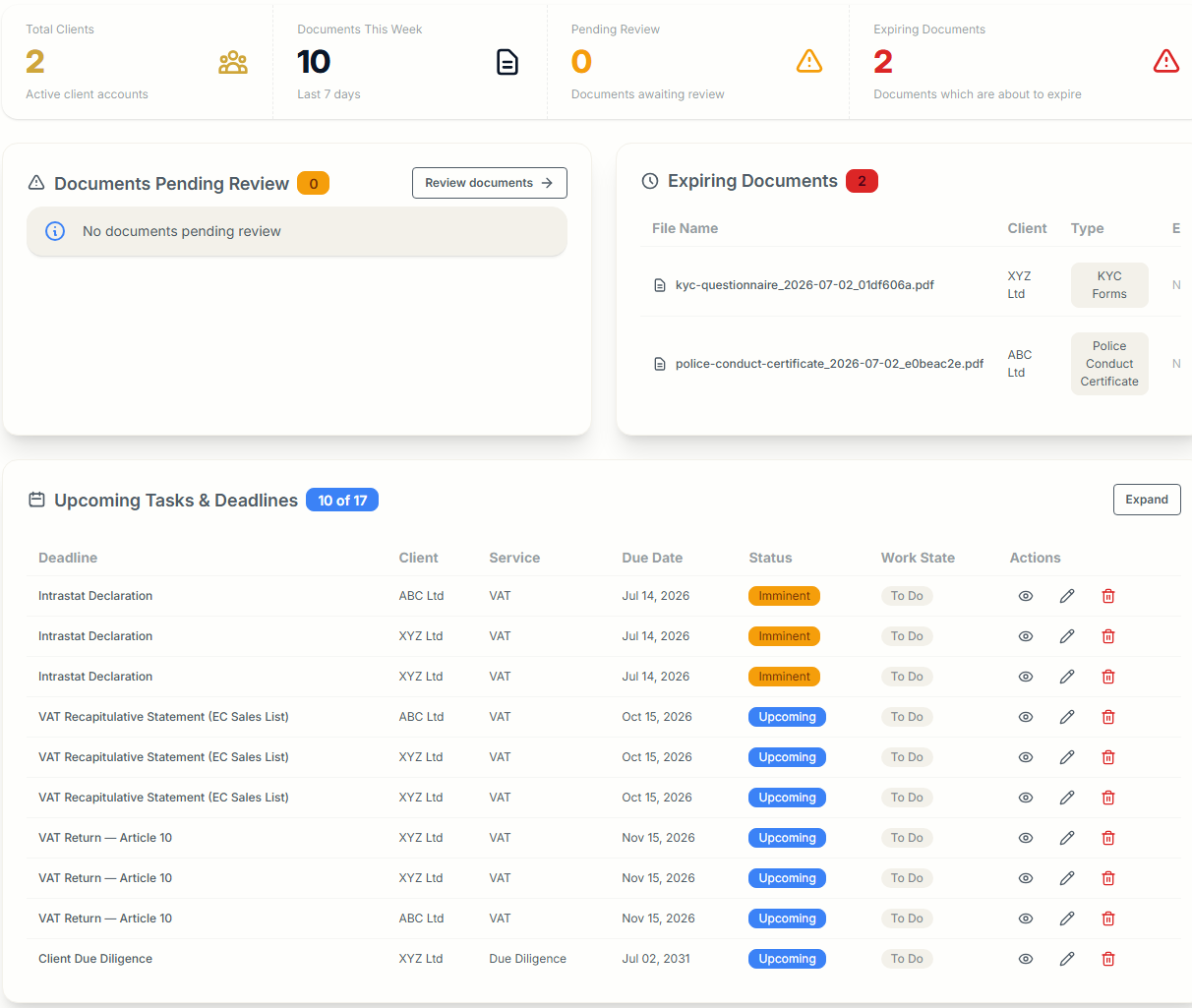
Every job has an owner, and Ziffa emails them when it is assigned.
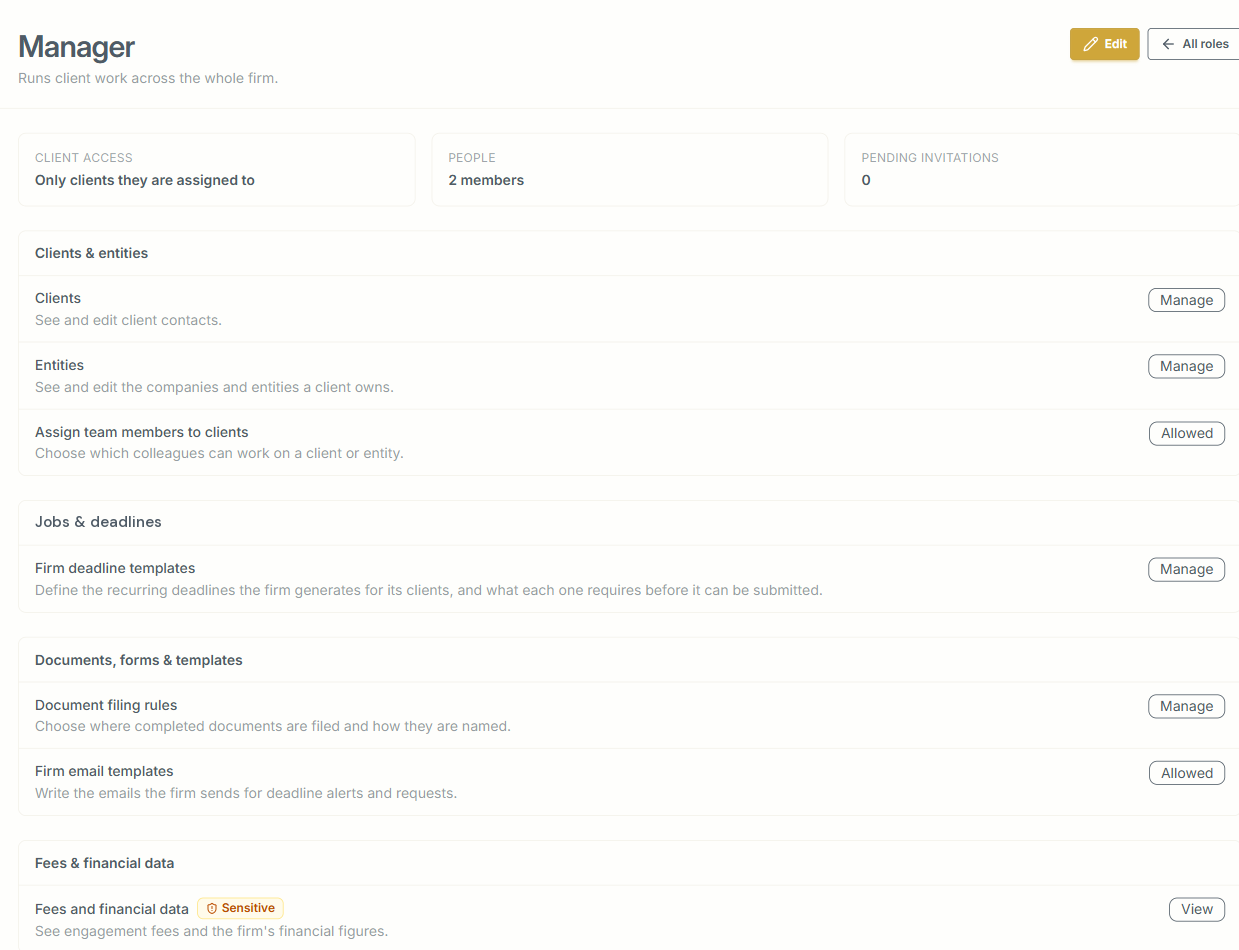
Partners also decide what each role can see and change, from clients and deadlines to templates and fees.
The power of saved views
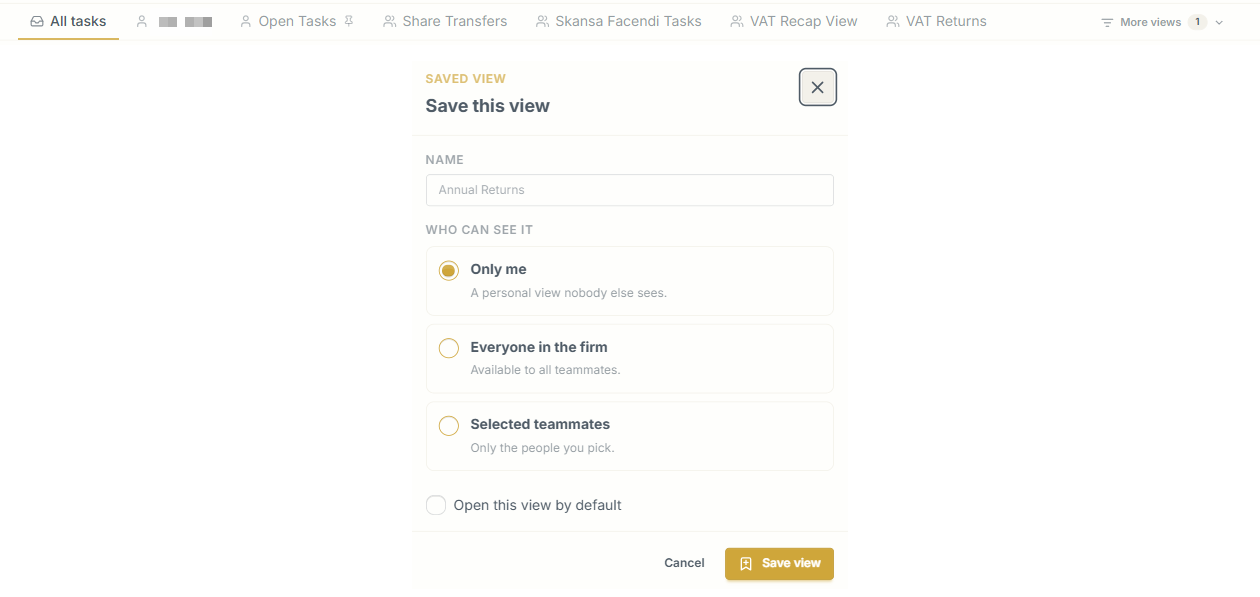
Any combination of filters can be saved as a view and opened again in one click.
For example, you might keep:
- one client’s open and recurring jobs, for the partner who looks after them;
- one person’s jobs, so a manager can see a colleague’s week before handing them more;
- one type of job across every client, such as this quarter’s VAT returns, so whoever runs VAT sees every return in a single list;
- one large job, like an audit, split into subtasks, with all its progress in one place.
You choose who sees each view: just you, everyone in the firm, or the teammates you pick. You can also set one to open by default, so on Monday morning the first thing you see is the list you actually work from.
Everything about a job, on one page
Open a job and you can see where it stands without having to ask anyone.
The progress bar shows the subtasks completed and the time logged, while the panel beside it shows the work state, due date, owner, time budget and how many emails have already gone out for it.
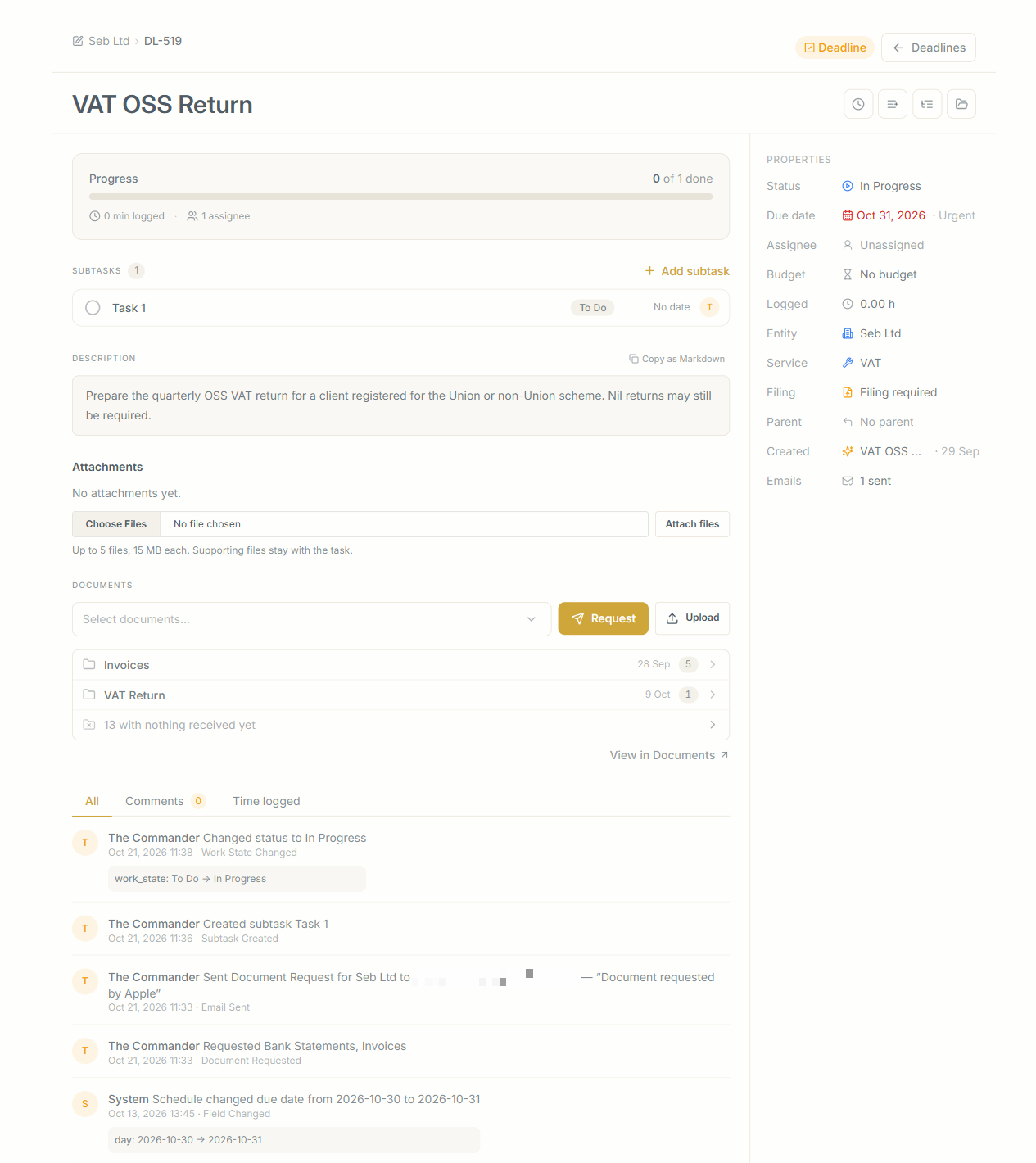
Moving a job from To Do to In Progress, On Hold or Completed takes a couple of clicks, and every move is logged.
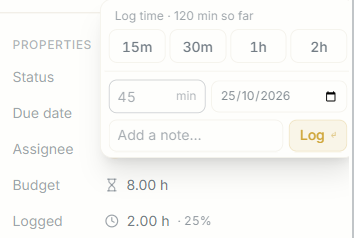
Each job can also carry a budget in hours, and the time your team logs against it is shown as a percentage of that budget.
If an eight-hour VAT return is already at six hours and the client’s bank statements are still missing, you can see it while there is still time to do something about it.
Logging time takes seconds: choose 15 minutes, 30 minutes, one hour or two hours, or enter the exact number of minutes, then select the date and add a note.
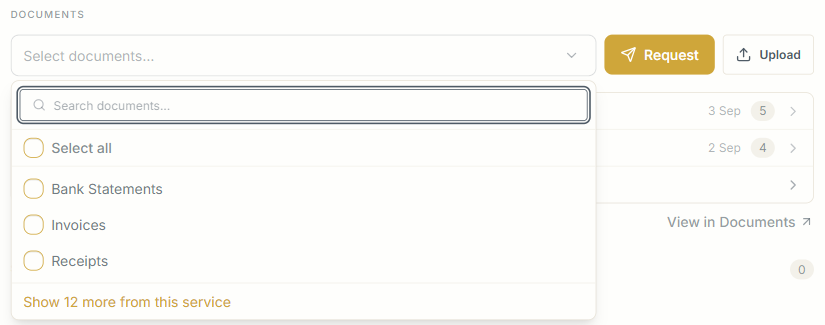
The job also lists every document that has arrived for it, grouped by category, together with how many are still outstanding.
To chase what is missing, select the document types and press Request. Ziffa emails the client for you.
If a client hands you a document at the office, you can upload it directly from the job and it goes through the same checks as everything else.
Any working files you need, up to five files of 15 MB each, can also stay attached to the job.
Every status change, document request, email, subtask and hour logged is recorded together with who did it and when.
Your team can also leave comments directly on the job.
If a colleague is off sick in the middle of the February rush, whoever picks up the job can understand its full history in a minute.
The whole year on one screen
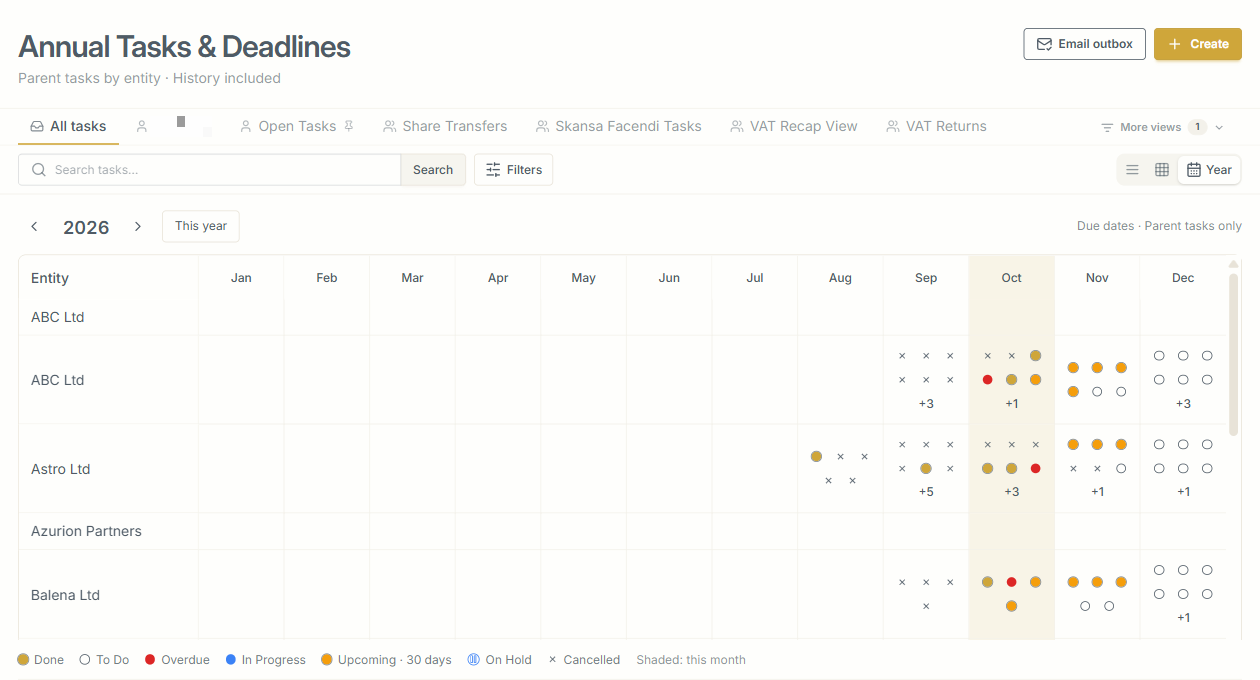
The year view gives every client a row and every month a column, with a dot for each job: done, to do, in progress, on hold, overdue, or due within the next 30 days.
On one screen you can see what has been completed since January, what is late this month and what is still coming before December.
You can also step back and look at the previous year.
Once a job is completed, it leaves the open jobs list but stays in the year view as a record of the work.
The client is asked before anyone remembers to ask
As each deadline approaches, Ziffa emails the client requesting exactly the documents that particular job requires.
If reminders are enabled, they then follow automatically according to the schedule you set.
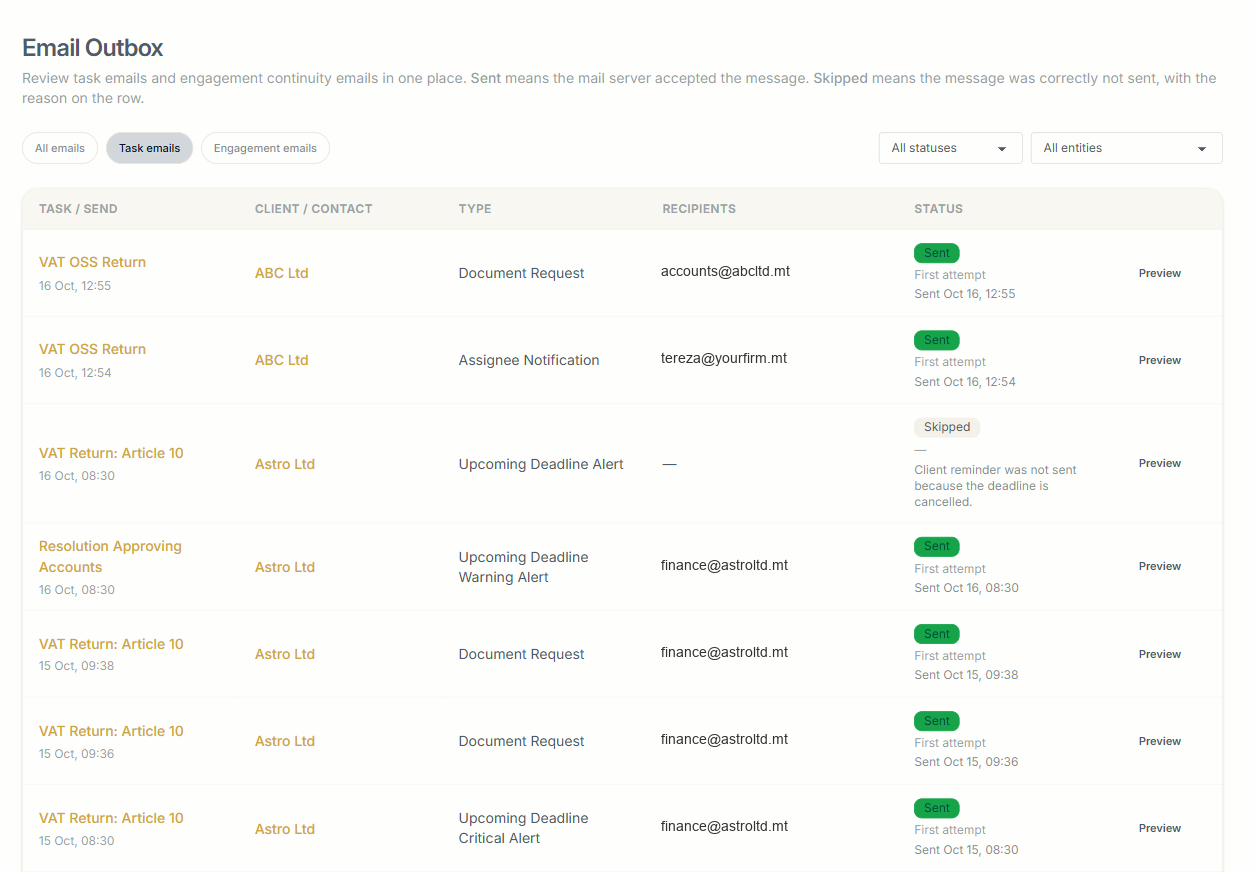
Every document request, deadline alert and assignee notification is recorded in one outbox, showing whether it was sent and, if it was not, why.
What changes
Nobody has to hold the whole year in their head. Every deadline is visible, every job has a named owner, the client has already been asked, and the outbox shows when.
If you’re already looking at next quarter and wondering how everything is going to get done, book a walkthrough. We’ll give you a no-commitment test account with the key defaults already set up, so you can see every deadline, job owner, outstanding request and next action in one place before deciding whether Ziffa is right for you.