The documents are in. Now what?

Ask anyone in an accounting practice how many times they’ve typed a client’s company number this year. It goes into the proposal and the engagement letter, the MBR forms, the contracts and client authorisation forms, and the tax return, once for every submission. What about the employer number? Every FS4, FS5 and FS7, every Jobsplus and Identità form, every employment contract. And the beneficial owners’ details? Typed into the onboarding questionnaire, the KYC platform and every declaration that asks for them. Each time it’s a different screen and another chance of a typo.
Collecting documents is where a lot of the time goes, and that’s the problem Ziffa first set out to solve. But you collect them to do something: prove a client’s identity, compile a ledger, file a statutory submission like an annual return or a tax return. This is what Ziffa does with them once they arrive.
Every document is checked before it’s filed
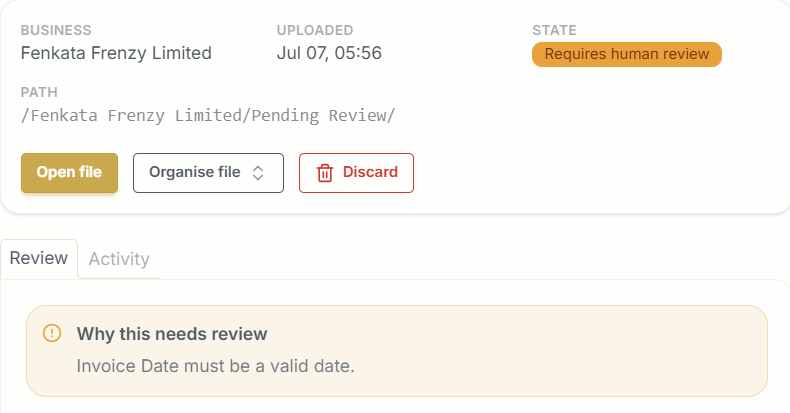
Ziffa reads every document and checks whether it is complete, correct and timely before it is filed. These are some practical instances when a document did not pass Ziffa’s validation tests:
- An invoice with no date, or with no total.
- An invoice made out to a private person, where the VAT can’t be claimed.
- An expired passport, ID card or residence permit.
- A proof of address older than six months.
- A certificate of good standing older than three months.
- A document the service doesn’t need, like an ID card sent in for a VAT return.
Anything that fails goes to Pending Review with the reason, so your team decides what happens to it.
Filed where you want it
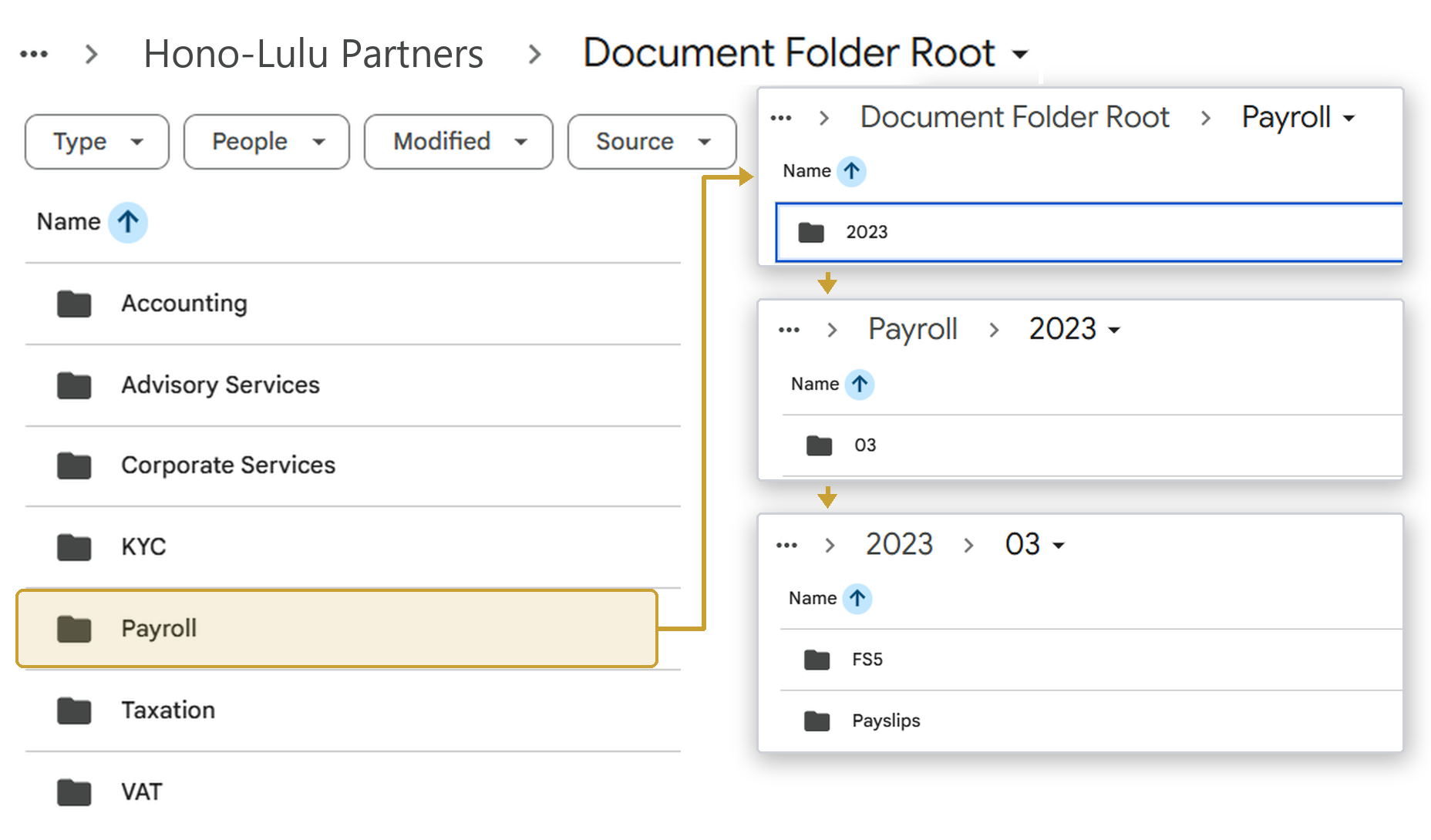
Whatever passes is renamed and filed into your own Google Drive or SharePoint. You decide the folder for each document and how its files are named, and every client follows the same structure. A bank statement arrives as scan0003.pdf and can be filed as BANK STATEMENT - FENKATA FRENZY LIMITED - BOV, in the client’s Accounting folder under the respective monthly subfolder. Anyone on your team can find it in seconds.
Renewals before they become a problem
Because Ziffa reads the dates on each document, it knows when a passport, a residence permit or a certificate of good standing runs out. Your dashboard shows what has expired, what expires within the next 90 days and which documents still need a date, so you can request the renewal or turn it into a job before the client’s file falls out of date.

Clients not on Xero or Sage? Excel is enough
Every invoice and receipt Ziffa reads keeps its details: date, supplier, VAT number, net amount, VAT and total. Filter a particular client’s documents to invoices and receipts, excluding proformas and non-fiscal receipts, pick the date range, and export as CSV from the documents view. That’s your purchases and sales listing for the general ledger, without keying in a single line. Purchase and sales invoices can also go to Xero as drafts for your team to approve.
Templates: created once, used everywhere
Every client you onboard into Ziffa gets a record: legal name, ID or company number, address, primary and supporting contacts, the services they’ve engaged you for, and key details such as the VAT number, VAT period end, PE number, income tax number, financial year end and, for companies, the date of incorporation. Those details fill the forms you need throughout the engagement: engagement letters, letters of service, powers of attorney, director indemnity letters and client authorisation letters.
As the client’s documents come in, Ziffa can store the details it reads from them: directors’ ID card numbers, nationality and date of birth from their proof of identity, and their home address from a proof of address. Those details fill your MBR and Jobsplus forms before you send them for approval or digital signature through Ziffa.
Ziffa captures each detail once, and every template after that is filled from the same record: this year’s annual return, next month’s Jobsplus form, the new engagement letter when the client adds a service. Nobody types the details again.
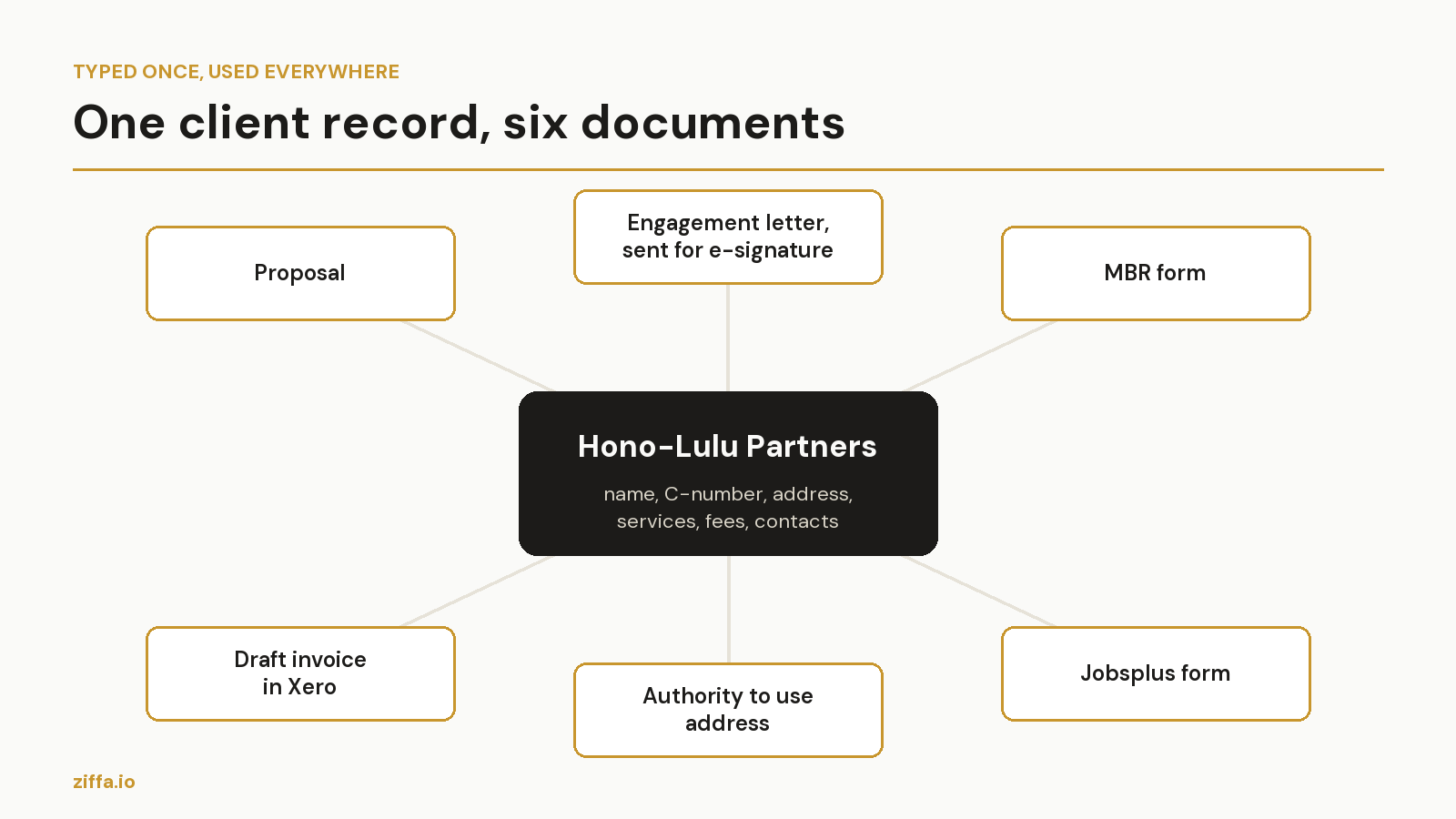
The templates are yours: the documents your firm fills in most often are set up once during implementation. For our partners we’ve built proposals, engagement letters and letters of service, company and natural person onboarding forms, authorities to use an address, company constitutive documents, partnership agreements, association statutes, powers of attorney, and MBR and Jobsplus forms. Each one is filled from the client record and can be sent for approval, for signature or by email from Ziffa.
Onboarding: from proposal to signature without retyping
Take a new client. You agree the services on a call and select them in Ziffa, and your own branded proposal fills itself with the client’s details and the agreed fees. You check it and send it to the client for approval from Ziffa. For services that don’t need due diligence first, you can send the engagement letter for digital signature at the same time.
Every step is on record: created, sent, viewed, signed, completed, certificate stored. The signed copy is filed in the client’s folder without anyone touching it.
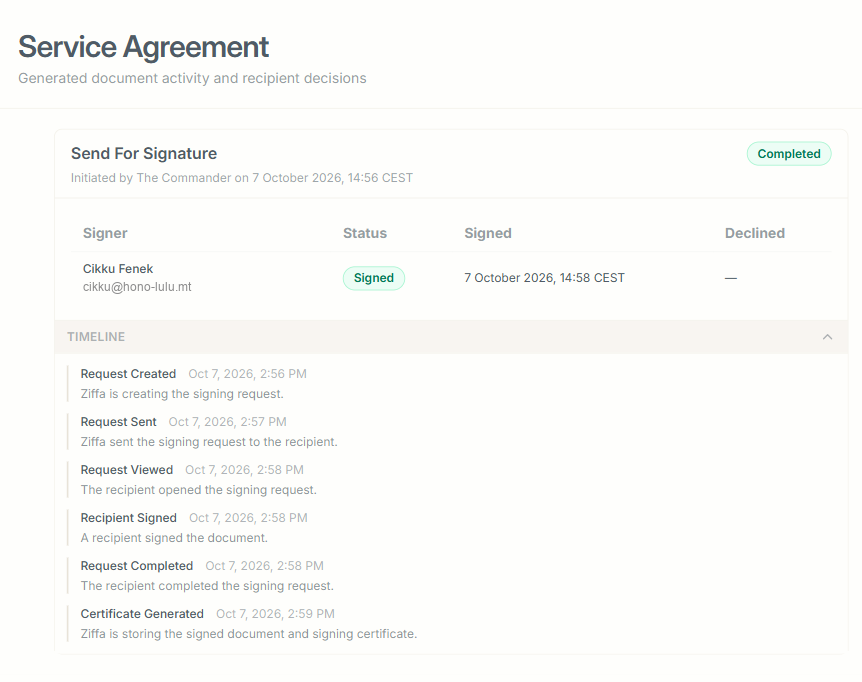
The next step starts on its own. Once the proposal is approved or the engagement letter is signed, whichever your firm chooses, the client moves from Prospect to Pending Review and the due diligence document collection starts in Ziffa.
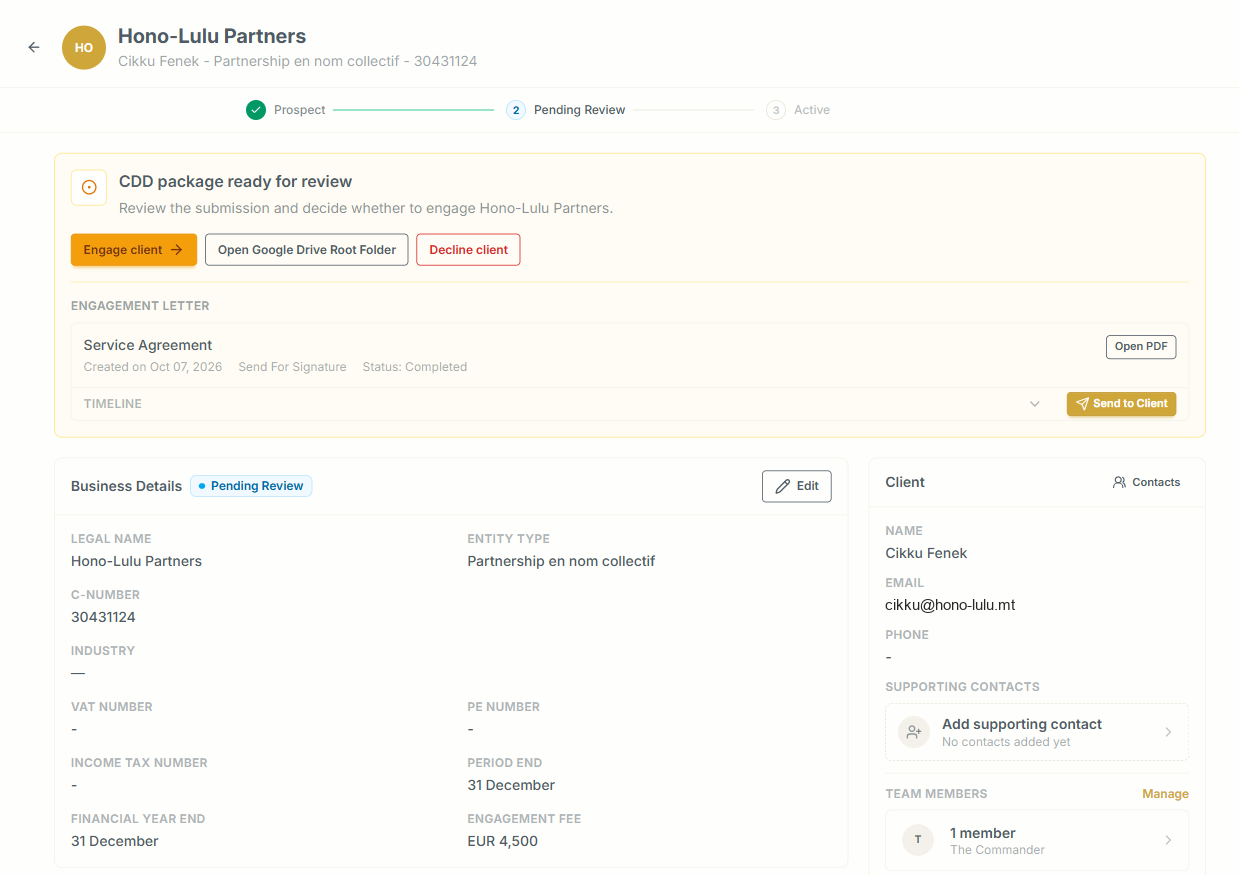
Once the KYC is done and a risk rating is assigned, your engagement letter or letter of service is ready to generate from its template, already filled in. You choose which of your firm’s companies issues it, check it and send it.
Bills drafted before you think of them
The fees you agreed in the engagement letter become draft invoices in Ziffa’s billing, either every month or tied to a deadline. Take a client whose VAT quarter ends on 30 September. The return is due on 22 November, and if you’ve set drafts to be ready 30 days before a deadline, the VAT bill is waiting for review in late October. Your team reviews and issues it, so nothing goes to a client without someone pressing the button.
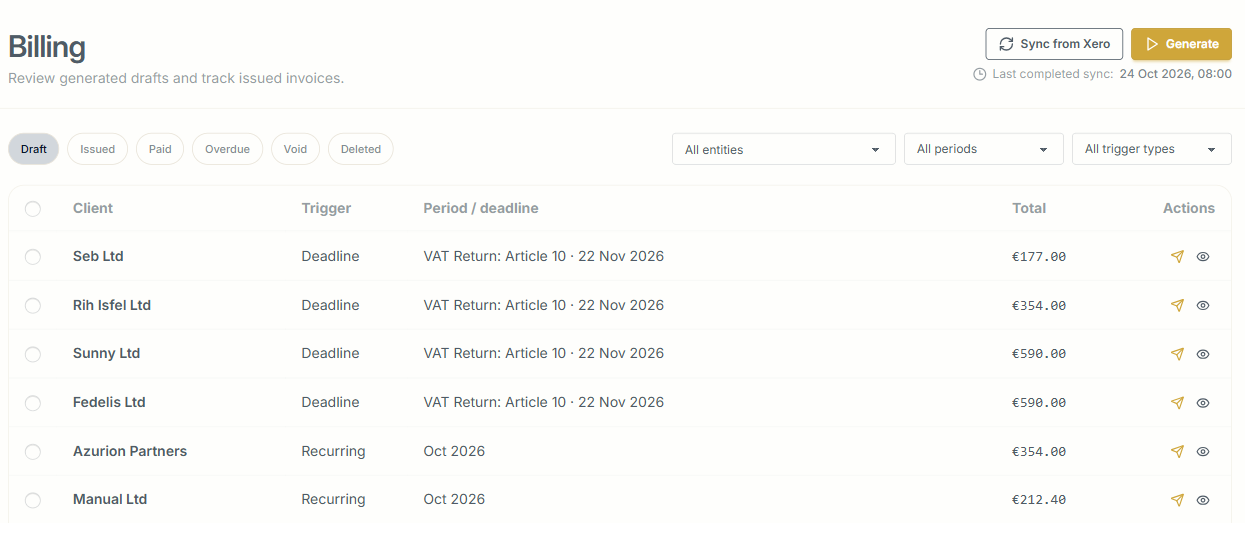
When your prices change, you raise or lower the fee for a service across every client in one go, and Ziffa notifies the clients before the new fee starts.
Automation at its finest
Picture switching on your laptop on a Monday morning in the middle of tax season. Without anyone on your team touching it, Ziffa has already:
- asked every client with a VAT return due next month for exactly the invoices and statements you need for the return and the recapitulative statement;
- reminded the client who still hasn’t signed the engagement letter, 3 days and again 1 day before the request expires;
- put next year’s VAT returns, FS7s and annual returns in your team’s job list, each with its due date, so clients can be reminded, work can be assigned to team members and time logged against it;
- renamed and filed everything your clients uploaded over the weekend, and told you what arrived so you can start the work, and what jobs remain pending;
- kept a record of every step, whether a client, a colleague or Ziffa itself took it.
Get your team’s time back
Each of these saves a little. Together, they mean a client’s details are typed once, every document is checked before it’s filed, renewals show up before they lapse, and the bills are drafted for you. Your people spend their time on the work they’re qualified for.
To watch one client go from a call to a signed engagement letter and a draft invoice, book a walkthrough. Send us your engagement letter beforehand and we’ll show you what it looks like inside Ziffa.